
CN: Alipay, WeChatPay, UnionPay - Payments
"paymentMethodName": "AliPay" OR "WeChatPay" OR "UnionPay"
Payment Method Features
| Feature | AliPay | WeChatPay | UnionPay |
|---|---|---|---|
| Country | China | China | China |
| "paymentMethodName" in API | AliPay | WeChatPay | UnionPay |
| Processing Currencies | CNY, GBP, USD, EUR, HKD | CNY, GBP, USD, EUR, HKD | CNY, GBP, USD, EUR, HKD, SGD |
| Payments | Yes | Yes | Yes |
| -- Authentication | None | None | None |
| -- Min per transaction amount | 0.01 CNY | -- | -- |
| -- Max per transaction amount | Vary, depends on your contract | 50,000 USD | -- |
| Disbursements | No | No | No |
| Refunds | Yes | Yes | Yes |
| -- Partial Refund | Yes | Yes | Yes |
| -- Multiple Partial Refunds | Yes | Yes | Yes |
| Chargebacks | No | No | No |
Possible Payment Scenarios:
Our API will provide you with all the necessary information to execute on of the following scenarios:
| Name | Steps |
|---|---|
| Displaying a QR Code in a Web Browser |
|
| Payment via Mobile Application |
|
AliPay, WeChatPay, UnionPay Payment & Refund Workflow
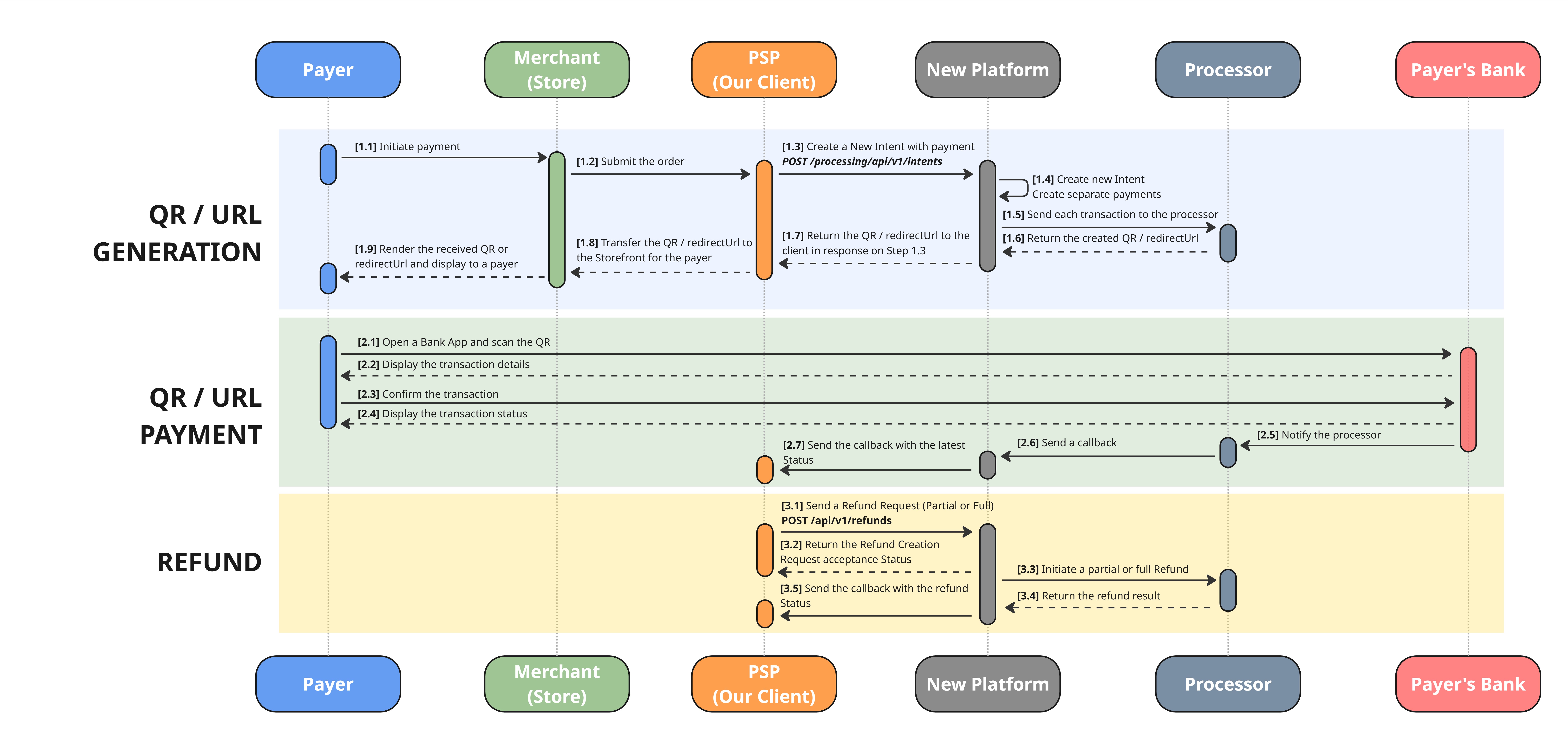
High-resolution image is available on the link: AliPay_WeChat_UnionPay.jpg
Section “QR Generation”
[Step 1.3] You need to create a new intent
-
Use the following API method to create an intent:
POST /processing/api/v1/intents. -
When creating the intent, complete the
Paymentobject. -
Most fields are common across all payment methods and are thoroughly described in the API Reference section.
-
Method-specific parameters ( please make sure you provided them correctly):
-
Payment method Difference Request parameters AliPay App On Desktop browser, after selecting Alipay as a payment method merchant checkout, a QR code appears. The shopper then opens Alipay app on their mobile phone and scans the barcode displayed on the browser page to complete the payment. "paymentMethodName" : "AliPay""incomingDetails": {"terminalType"="APP", "osType" = "IOS"/"ANDROID"}
AliPay Web On the mobile browser, a shopper selects Alipay as a payment method on Merchant checkout, and as redirected from the browser into the Alipay app to complete the payment before being redirected back to the Merchant browser. "paymentMethodName" : "AliPay""incomingDetails": {"terminalType" = "WEB"}
WeChatPay Web On Desktop browser, after selecting WeChatPay as a payment method merchant checkout, a QR code appears. The shopper then opens WeChat app on their mobile phone and scans the barcode displayed on the browser page to complete the payment. "paymentMethodName" : "WeChatPay""incomingDetails": {"terminalType" = "WEB", "clientIp"=""}
WeChatPay Wap On the mobile browser, a shopper selects WeChatPay as a payment method on Merchant checkout, and as redirected from the browser into the WeChatPay app to complete the payment before being redirected back to the Merchant browser. -
"paymentMethodName" : "WeChatPay" -
"incomingDetails": {"terminalType" = "WAP", "clientIp"=""}
UnionPay Using unionpay, customers pay by redirecting from your website or app, finish the payment, then return to your website or app where you get immediate notification on whether the payment succeeds or fails. "paymentMethodName" : "UnionPay"
- Ensure these all the required fields are completed accurately so that we can process your request correctly.
Intent Creation — Request / Response
Request specifics
- Endpoint:
POST /processing/api/v1/intents- Purpose: Creates an
Intentand aPaymentfor the selected payment method (AliPay / WeChatPay / UnionPay).- Structure: A unified request structure is used for all methods — only
incomingDetailsdiffers per method and scenario (see the Difference table above).- For these methods:
paymentMethodNamemust beAliPay,WeChatPay, orUnionPayauthCurrencyCodeis alwaysCNYincomingDetails.returnUrlis required for all methods;terminalType,osType, andclientIpare conditional (see the field tables below)
Intent Request: Example
{
    "clientReferenceId": "1234",
    "payments": [
        {
            "paymentInstrument": {
                "paymentMethodName": "AliPay",
                "incomingDetails": {
                    "returnUrl": "http://example.com/",
                    "terminalType": "APP",
                    "osType": "IOS"
                }
            },
            "description": "Purchase description",
            "webhookUrl": "webhookUrl",
            "submittedAmount": {
                "value": 100.05,
                "currency": "USD"
            },
            "authCurrencyCode": "CNY"
        }
    ]
}
{
"clientReferenceId": "1234",
"payments": [
{
"paymentInstrument": {
"paymentMethodName": "AliPay",
"incomingDetails": {
"returnUrl": "http://example.com/",
"terminalType": "WEB"
}
},
"description": "Purchase description",
"webhookUrl": "webhookUrl",
"submittedAmount": {
"value": 100.05,
"currency": "USD"
},
"authCurrencyCode": "CNY"
}
]
}{
"clientReferenceId": "1234",
"payments": [
{
"paymentInstrument": {
"paymentMethodName": "WeChatPay",
"incomingDetails": {
"returnUrl": "http://example.com/",
"terminalType": "WEB",
"clientIp": "clientIp"
}
},
"description": "Purchase description",
"webhookUrl": "webhookUrl",
"submittedAmount": {
"value": 100.05,
"currency": "USD"
},
"authCurrencyCode": "CNY"
}
]
}{
"clientReferenceId": "1234",
"payments": [
{
"paymentInstrument": {
"paymentMethodName": "WeChatPay",
"incomingDetails": {
"returnUrl": "http://example.com/",
"terminalType": "WAP",
"clientIp": "clientIp"
}
},
"description": "Purchase description",
"webhookUrl": "webhookUrl",
"submittedAmount": {
"value": 100.05,
"currency": "CNY"
},
"authCurrencyCode": "CNY"
}
]
}{
"clientReferenceId": "1234",
"payments": [
{
"paymentInstrument": {
"paymentMethodName": "UnionPay",
"incomingDetails": {
"returnUrl": "http://example.com/"
}
},
"description": "Purchase description",
"webhookUrl": "webhookUrl",
"submittedAmount": {
"value": 100.05,
"currency": "USD"
},
"authCurrencyCode": "CNY"
}
]
}Intent Request: Fields Description
Top-Level Request Parameters
| Parameter | Type | Required | Description |
|---|---|---|---|
clientReferenceId | String | Required | The client/merchant intent reference (aka Transaction Reference). |
payments | Array of Objects | Required | List of payment objects to be created within the Intent. |
payment
| Parameter | Type | Required | Description |
|---|---|---|---|
paymentInstrument | Object | Required | Payment method and instrument details used to process the payment. |
submittedAmount | Object | Required | Amount and currency submitted for the payment. |
authCurrencyCode | String | Required | Authorisation currency in which the transaction is processed. Always CNY for these methods. |
description | String | Required | Payment description (arbitrary string). |
webhookUrl | String | Optional | URL to which payment status change webhooks will be sent. |
paymentInstrument
| Parameter | Type | Required | Description |
|---|---|---|---|
paymentMethodName | String | Required | Payment method name. One of AliPay, WeChatPay, UnionPay. |
incomingDetails | Object | Required | Method-specific data required to initiate the payment. |
incomingDetails
| Parameter | Type | Required | Methods | Description |
|---|---|---|---|---|
returnUrl | String | Required | AliPay, WeChatPay, UnionPay | The URL on the Merchant’s side to which the Payer is redirected upon completion of the operation, instead of being shown the default receipt page. |
terminalType | String | Conditional | AliPay, WeChatPay | Depends on the payment method and scenario. AliPay: APP / WEB. WeChatPay: WEB / WAP. |
osType | String | Conditional | AliPay | Required if terminalType = APP. Values: IOS / ANDROID. |
clientIp | String | Conditional | WeChatPay | Required for WeChatPay. |
submittedAmount
| Parameter | Type | Required | Description |
|---|---|---|---|
value | Number | Required | Transaction amount. |
currency | String | Required | Original currency of the transaction. May differ from the auth currency; converted into CNY during processing. |
Response specifics
- The Intent creation response is generally consistent across all supported payment methods.
- Common fields describe the
Intent, thePayment, and the current transaction status.- Method-specific data needed to display the QR code or redirect the payer is returned in
payments[].additionalData.details.
Two key fields to continue the payment — both are returned inside
payments[].additionalData.details:
url— the URL to which the payer should be redirected to complete the payment.qrBase64— the QR code (PNG) encoded in Base64, ready to be rendered on your page.
Intent Response: Example
{
    "intentId": "232510340021612544",
    "payments": [
        {
            "id": "232510340646563840",
            "submittedAmount": {
                "value": 100.05,
                "currency": "USD"
            },
            "authAmount": {
                "value": 100.05,
                "currency": "CNY"
            },
            "paymentInstrument": {
                "id": "PI204264628196626432",
                "paymentMethodId": "PM199507277233246209",
                "paymentMethodName": "AliPay",
                "storedDetails": {
                    "returnUrl": "http://example.com/",
                    "terminalType": "APP",
                    "osType": "IOS"
                }
            },
            "status": "AUTHORIZATION_REQUESTED",
            "additionalData": {
                "details": {
                    "url": "url",
                    "qrBase64": "qrBase64"
                }
            }
        }
    ],
    "disbursements": [],
    "clientReferenceIntentId": "123456789",
    "paymentCreationErrors": [],
    "disbursementCreationErrors": [],
    "intentStatus": "IN_PROGRESS"
}
{
"intentId": "232510340021612544",
"payments": [
{
"id": "232510340646563840",
"submittedAmount": {
"value": 100.05,
"currency": "USD"
},
"authAmount": {
"value": 100.05,
"currency": "CNY"
},
"paymentInstrument": {
"id": "PI204264628196626432",
"paymentMethodId": "PM199507277233246209",
"paymentMethodName": "AliPay",
"storedDetails": {
"returnUrl": "http://example.com/",
"terminalType": "WEB"
}
},
"status": "AUTHORIZATION_REQUESTED",
"additionalData": {
"details": {
"url": "url",
"qrBase64": "qrBase64"
}
}
}
],
"disbursements": [],
"clientReferenceIntentId": "123456789",
"paymentCreationErrors": [],
"disbursementCreationErrors": [],
"intentStatus": "IN_PROGRESS"
}{
"intentId": "232510340021612544",
"payments": [
{
"id": "232510340646563840",
"submittedAmount": {
"value": 100.05,
"currency": "USD"
},
"authAmount": {
"value": 100.05,
"currency": "CNY"
},
"paymentInstrument": {
"id": "PI204264628196626432",
"paymentMethodId": "PM199507277233246209",
"paymentMethodName": "WeChatPay",
"storedDetails": {
"returnUrl": "http://example.com/",
"terminalType": "WEB",
"clientIp": "clientIp"
}
},
"status": "AUTHORIZATION_REQUESTED",
"additionalData": {
"details": {
"url": "url",
"qrBase64": "qrBase64"
}
}
}
],
"disbursements": [],
"clientReferenceIntentId": "123456789",
"paymentCreationErrors": [],
"disbursementCreationErrors": [],
"intentStatus": "IN_PROGRESS"
}{
"intentId": "232510340021612544",
"payments": [
{
"id": "232510340646563840",
"submittedAmount": {
"value": 100.05,
"currency": "CNY"
},
"authAmount": {
"value": 100.05,
"currency": "CNY"
},
"paymentInstrument": {
"id": "PI204264628196626432",
"paymentMethodId": "PM199507277233246209",
"paymentMethodName": "WeChatPay",
"storedDetails": {
"returnUrl": "http://example.com/",
"terminalType": "WAP",
"clientIp": "clientIp"
}
},
"status": "AUTHORIZATION_REQUESTED",
"additionalData": {
"details": {
"url": "url",
"qrBase64": "qrBase64"
}
}
}
],
"disbursements": [],
"clientReferenceIntentId": "123456789",
"paymentCreationErrors": [],
"disbursementCreationErrors": [],
"intentStatus": "IN_PROGRESS"
}{
"intentId": "232510340021612544",
"payments": [
{
"id": "232510340646563840",
"submittedAmount": {
"value": 100.05,
"currency": "USD"
},
"authAmount": {
"value": 100.05,
"currency": "CNY"
},
"paymentInstrument": {
"id": "PI204264628196626432",
"paymentMethodId": "PM199507277233246209",
"paymentMethodName": "UnionPay",
"storedDetails": {
"returnUrl": "http://example.com/"
}
},
"status": "AUTHORIZATION_REQUESTED",
"additionalData": {
"details": {
"url": "url",
"qrBase64": "qrBase64"
}
}
}
],
"disbursements": [],
"clientReferenceIntentId": "123456789",
"paymentCreationErrors": [],
"disbursementCreationErrors": [],
"intentStatus": "IN_PROGRESS"
}
Note for WeChatPay WAPThe
urlreturned in the response can be opened only from a domain that has been pre-approved (whitelisted) with us. Contact your integration manager to register your domain before going live.
Intent Response: Fields Description
Top-Level Response Parameters
| Parameter | Type | Required | Description |
|---|---|---|---|
intentId | String | Required | Unique identifier of the Intent in our platform. |
payments | Array of Objects | Required | List of Payment objects created within the Intent. |
disbursements | Array | Optional | List of disbursement objects. Empty for these payment methods. |
clientReferenceIntentId | String | Required | Order number in the merchant system. Returned from the request. |
paymentCreationErrors | Array | Required | List of payment creation errors, if any. Empty if no errors occurred. |
disbursementCreationErrors | Array | Required | List of disbursement creation errors, if any. Empty if no errors occurred. |
intentStatus | String | Required | Current Intent status (e.g. IN_PROGRESS). |
payment
| Parameter | Type | Required | Description |
|---|---|---|---|
id | String | Required | Unique identifier of the Payment in our platform. |
submittedAmount | Object | Required | Submitted payment amount and currency. Returned from the request. |
authAmount | Object | Required | Authorised amount and currency used for the payment. |
paymentInstrument | Object | Required | Payment method information associated with the payment. |
status | String | Required | Current payment status (e.g. AUTHORIZATION_REQUESTED). |
additionalData | Object | Optional | Method-specific data required to continue or complete the payment flow. |
submittedAmount
| Parameter | Type | Required | Description |
|---|---|---|---|
value | Number | Required | Submitted amount. Returned from the request. |
currency | String | Required | Submitted currency. Returned from the request. |
authAmount
| Parameter | Type | Required | Description |
|---|---|---|---|
value | Number | Required | Authorised amount used for the payment. |
currency | String | Required | Authorisation currency used for the payment. Always CNY for these methods. |
paymentInstrument
| Parameter | Type | Required | Description |
|---|---|---|---|
id | String | Required | Unique identifier of the payment instrument in our platform. |
paymentMethodId | String | Required | Unique identifier of the payment method in our platform. |
paymentMethodName | String | Required | Payment method name. Returned from the request. |
storedDetails | Object | Optional | Stored payment instrument details. Echoed from the request. |
storedDetails
| Parameter | Type | Required | Methods | Description |
|---|---|---|---|---|
returnUrl | String | Required | AliPay, WeChatPay, UnionPay | Return URL. Returned from the request. |
terminalType | String | Conditional | AliPay, WeChatPay | Returned from the request. |
osType | String | Conditional | AliPay | Returned when terminalType = APP. Returned from the request. |
clientIp | String | Conditional | WeChatPay | Returned from the request. |
additionalData
| Parameter | Type | Required | Description |
|---|---|---|---|
details | Object | Required | Method-specific details required to continue or complete the payment flow. |
details
| Parameter | Type | Required | Description |
|---|---|---|---|
url | String | Required | URL to which the payer should be redirected to complete the payment. |
qrBase64 | String | Required | QR code (PNG) encoded in Base64, ready to be rendered on your page. |
Section “QR Payment”
[2.7] Receive the webhook with the transaction status
More about Payment Callbacks on the dedicated page
- After the transaction was processed and reached its final status (CAPTURED or DECLINED)
- The Platform will notify you about the latest status change via the callback
SIMPLE WEBHOOK WITH TRANSACTION STATUS
{
    "transactionType": "PAYMENT",
    "transactionId": "111122223333444455",
    "status": "ACCEPTED"
}
Test Data
Our system allows emulating different test cases in the sandbox environment. To simulate specific scenarios and receive different results, use the intent.description parameter.
Alipay, WeChatPay, UnionPay Payment Test flow
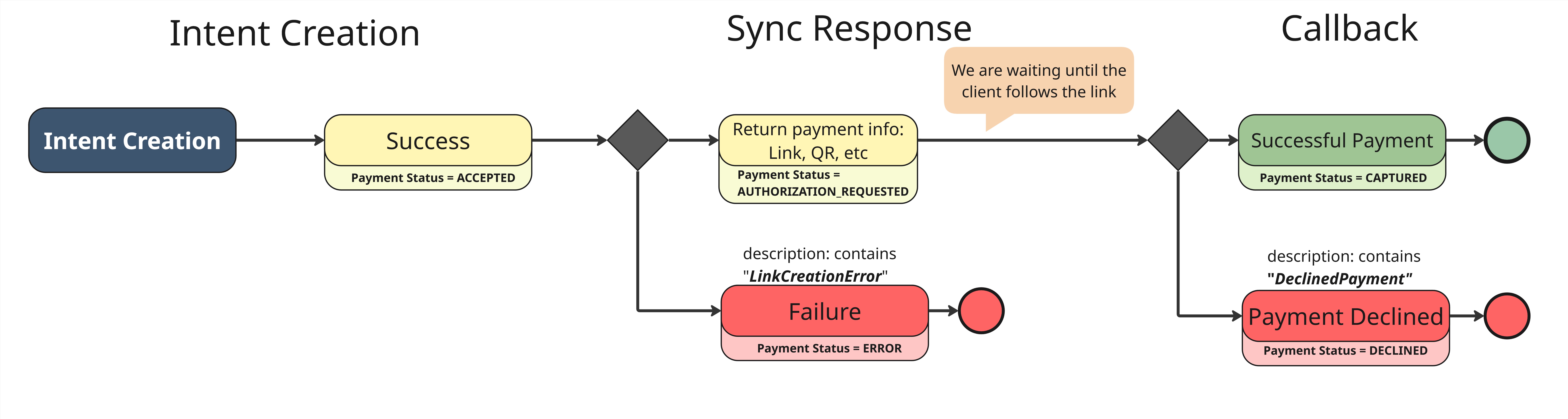
High-resolution image is available on the link: AliPay_WeChat_UnionPay_TestFlow.jpg
Case Description
| Case Name | intent.description | Scenario |
|---|---|---|
| Successful payment | -- (no keywords required) |
|
| Payment Declined | "DeclinedPayment" keyword must be added into the intent's description |
|
| Link Creation Failure | "LinkCreationError" keyword must be added into the intent's description |
|
Updated 3 days ago