
🇮🇩 IN: OVO, Dana LinkAja, ShopeePay
"paymentMethodName": "OVO", "Dana", "LinkAja", "ShopeePay"
Payment Method Features
| Payment Method | OVO | Dana | LinkAja | ShopeePay |
|---|---|---|---|---|
| Country | Indonesia | Indonesia | Indonesia | Indonesia |
| Processing Currencies | IDR | IDR | IDR | IDR |
| Payments | No | No | No | No |
| Disbursements | Yes | Yes | Yes | Yes |
| -- Min per transaction amount | 10,000 | 10,000 | 10,000 | 10,000 |
| -- Max per transaction amount | 20,000,000 | 20,000,000 | 20,000,000 | 20,000,000 |
| Refunds | No | No | No | No |
| Chargebacks | No | No | No | No |
Disbursements
Workflow
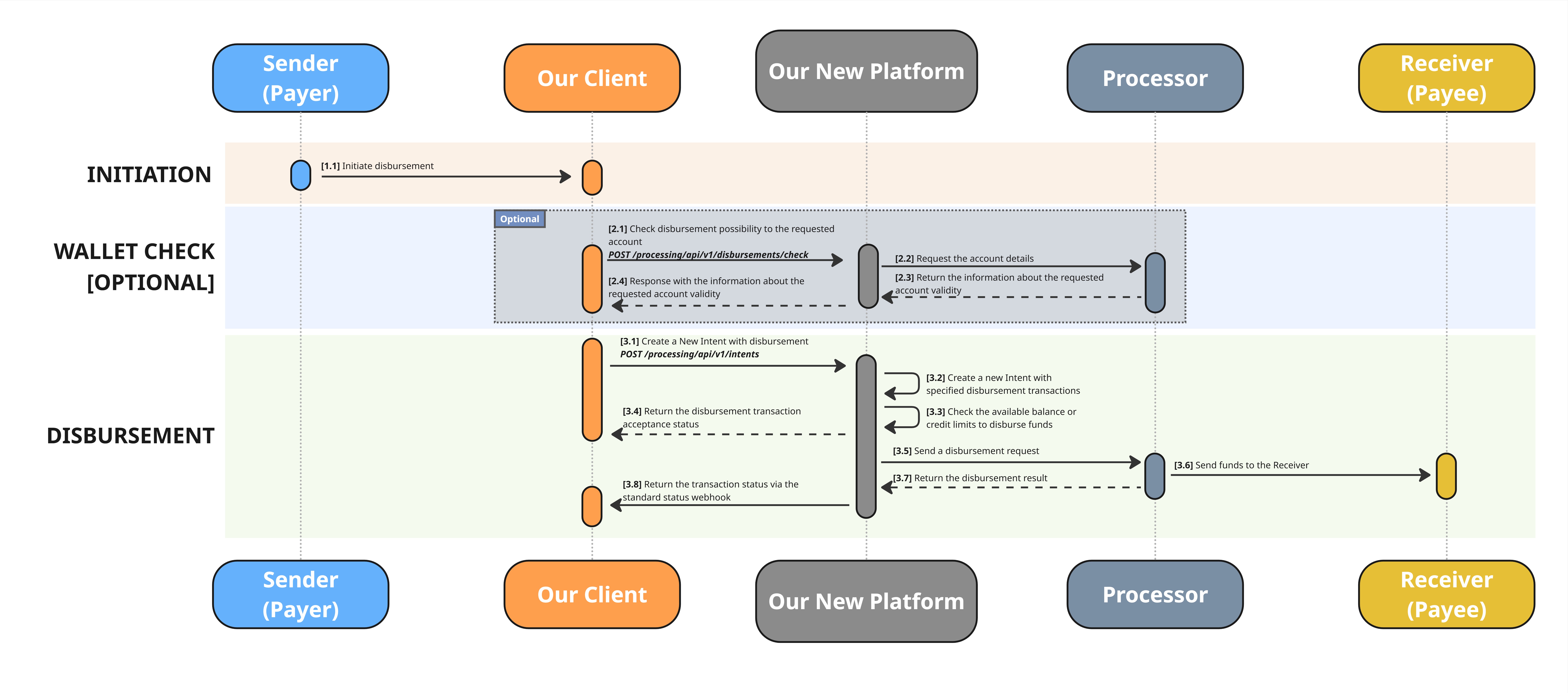
High-resolution image is available on the link: Indonesian E-Wallets Disbursements
KEY STEPS OF THE PROCESS
(Optional) [Step 2.1] Check disbursement possibility to the requested account
This step is optional.
You can use a dedicated API Endpoint to check if the account exists and the disbursement to this wallet is possible.
- Use the following API method to create an intent: POST /processing/api/v1/disbursements/check
- Get an attribute
isDisbursementAllowedin return with possible values True or False - Proceed to the next step if satisfied with the result
[Step 3.1] Create a New Intent with disbursement(s)
- Use the following API method to create an intent: POST /processing/api/v1/intents.
- When creating the intent, complete the
disbursementobject. - Most fields are common across all disbursement methods and are thoroughly described in the API Reference section.
- However, some fields are method-specific (for example,
disbursements[].payeePaymentInstrument.incomingDetails). - Ensure these fields are completed accurately so that we can process your request correctly.
Request Example
{
  "clientReferenceId": "202510202",
  "disbursements": [
    {
      "payeePaymentInstrument": {
        "paymentMethodName": "OVO",
        "incomingDetails": {
          "customerName": "ИВАН ИВАНОВ",
          "customerNumber": "6280004664000"
        }
      },
      "submittedAmount": {
        "value": null,
        "currency": "IDR"
      },
      "authAmount": {
        "value": 20000.00,
        "currency": "IDR"
      }
    }
  ]
}
disbursements[].payeePaymentInstrument.incomingDetails for Indonesian E-Wallets
disbursements[].payeePaymentInstrument.incomingDetails for Indonesian E-Wallets| Field | Required | Type | Description | Example |
|---|---|---|---|---|
| customerName | Yes | String | Possible values: "OVO", "Dana", "LinkAja", "ShopeePay" | OVO |
| customerNumber | Yes | String | Phone / Account Number starting from 62 | 6280004664000 |
disbursements[].submittedAmount and disbursements[].submittedAmount
disbursements[].submittedAmount and disbursements[].submittedAmountHaving two objects that looks similar might be confusing, however we need both objects to process your request correctly when the FX is involved.
Please follow the instruction on the dedicated page Amount Fields: submittedAmount and authAmount
[Step 3.4] Get the disbursement transaction acceptance status
- Before accepting the transition we need to validate the balance on the linked Settlement Account
- If the balance allows us to educt the disbursement amount + processing fee, the transaction will be accepted
- If there is no enough funds, and credit option is not availbale, then the transaction will be declined
- You can check you Balance in the Settlement Account Details on the Clinet Portal
- In both cases you will receive a response
[Step 3.8] Get the transaction status via the standard status webhook
- If the transaction was accepted, then no futher actions are reuired on your side. We will try disburse money and return you the trasnaction status via the webhook
- You will receive this information through a webhook. Examples are provided below:
{
    "transactionType": "PAYMENT",
    "transactionId": "111122223333444455",
    "status": "ACCEPTED"
}
Updated 2 months ago